# Assuming the step one virtual environemnt is set up and actiavted and ready in the terminal, run the following commands to install the classifai package and the huggingface dependencies.
## PIP
#!pip install "https://github.com/datasciencecampus/classifai/releases/download/v0.2.1/classifai-0.2.1-py3-none-any.whl"
#!pip install "classifai[huggingface]"

## UV
#!uv pip install "https://github.com/datasciencecampus/classifai/releases/download/v0.2.1/classifai-0.2.1-py3-none-any.whl"
#!uv pip install "classifai[huggingface]"VectorStore pre- and post- processing logic with Hooks🪝
Overview
This notebook provides a guide on how to implement custom, user-defined pre- and post-processing ‘hooks’. Hooks provide a way to modify the traditional data flow of the ClassifAI package so that you might, for example:
- Remove punctuation from input queries before the VectorStore search process begins,
- Capitalising all text in an input query to the Vectorstore search process,
- Deduplicate results based on the doc_id column so that duplicate knowledgebase entries are not returned,
- Prevent users of the package from retrieving certain documents in your vectorstore,
- Removing hate speech from any input text.
Hooks work by defining functions that operate on the input and output dataclasses of each of our VectorStore functions/methods.
Key Sections: - a recap of how the dataclasses for the VectorStore work, and how they ensure the proper flow of data in our package, - how hooks can be implemented by working with the dataclass objects, - examples of several different hook implementations, some of which were already mentioned above.
Recap of VectorStore Dataclasses
The majority of the following points are already covered in the recommended first notebook demo, general_workflow_demo.ipynb. So if you are unfamiliar with the package, that is a good place to start before this notebook, and for an intro to the VectorStore, its methods, and how it works with dataclasses.
ClassifAI uses Pandas dataframe-like dataclasses to specify what data need to be passed as input to the VectorStore methods/functions, and what data can be expected to be returned by those methods
The VectorStore class, responsible for performing different actions with your data, has three key methods/functions:
search()- Takes in a body of text and searches the vector store for semantically similar knowledgebase samples.
reverse_search()- Takes in document IDs and searches the vector store for entries with those IDs.
embed()- Takes in a body of text and uses the vectoriser model to convert the text into embeddings.
For each of these three core methods, we have created an input dataclass and an output dataclass. These dataclasses define pandas-like objects that specify what data needs to be passed to each method and also perform runtime checks to ensure you’ve passed the correct columns in a dataframe to the appropriate VectorStore method.
For example, the figure below illustrates the input and output dataclasses of the VectorStore.search() method:
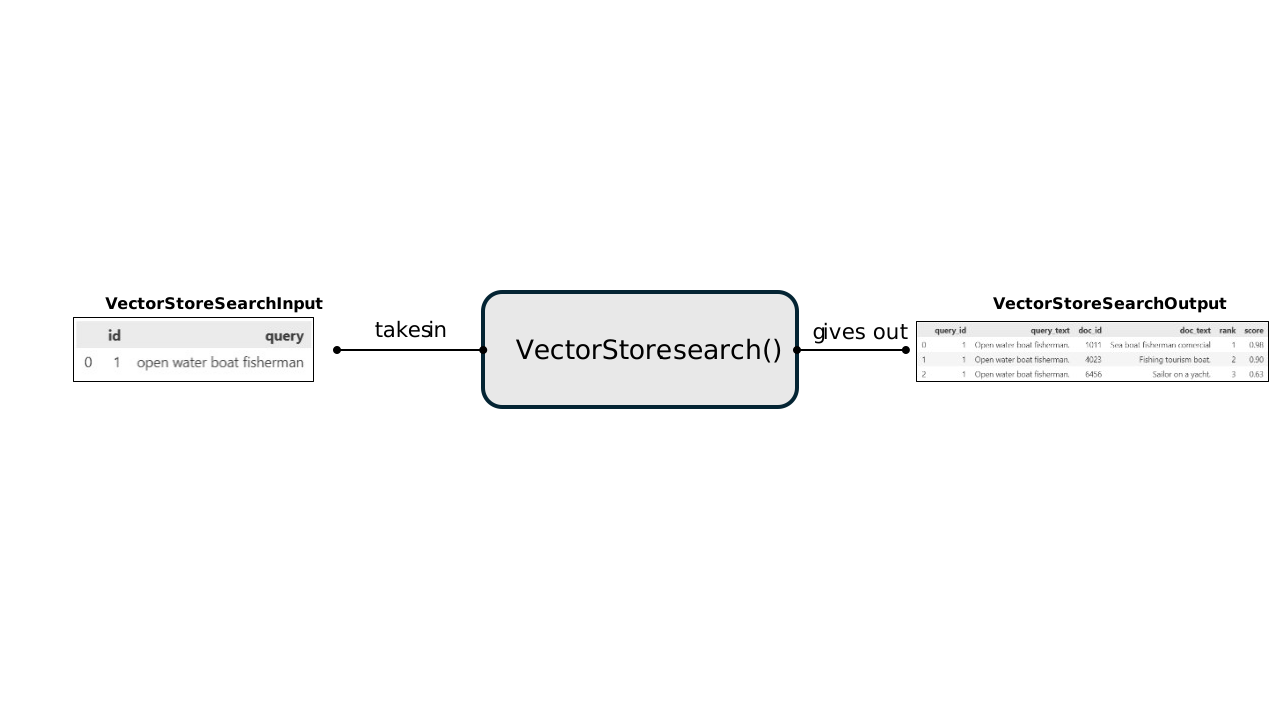
This shows that the VectorStore.search() method expects: - An input dataclass object with columns [id, query]. - To output an output dataclass object with columns [query_id, query_text, doc_id, doc_text, rank, score].
The use of these dataclasses both helps the user of the package to understand what data needs to be provided to the Vectorstore and how a user should interact with the objects being returned by these VectorStore functions. Additionally, this ensures robustness of the package by checking that the correct columns are present in the data before operating on it.
The reverse_search() and embed() VectorStore functions have their own input and output data classes with their own validity column data checks. The names of each set are intuitively: | VectorStore Method | Input Dataclass | Output Dataclass | |——————————-|—————————–|—————————–| | VectorStore.search() | VectorStoreSearchInput | VectorStoreSearchOutput | | VectorStore.reverse_search() | VectorStoreReverseSearchInput | VectorStoreReverseSearchOutput | | VectorStore.embed() | VectorStoreEmbedInput | VectorStoreEmbedOutput |
Users of the package can use the schema of each of these input and output dataclasses to understand how to interface with these main methods of the VectorStore class.
Hooks and custom dataflows
We have implemented ‘hooks’ where users can write a function that will manipulate the content of a dataclasses object before or after it passes through the VectorStore.
As long as your custom hook function takes as input an instance of a dataclass, and outputs a valid instance of the same type, then your custom function should run as a part of the end to end VectorStore process.
For example: you might want to preprocess the input to the VectorStore.search() method to remove punctuation from the texts:
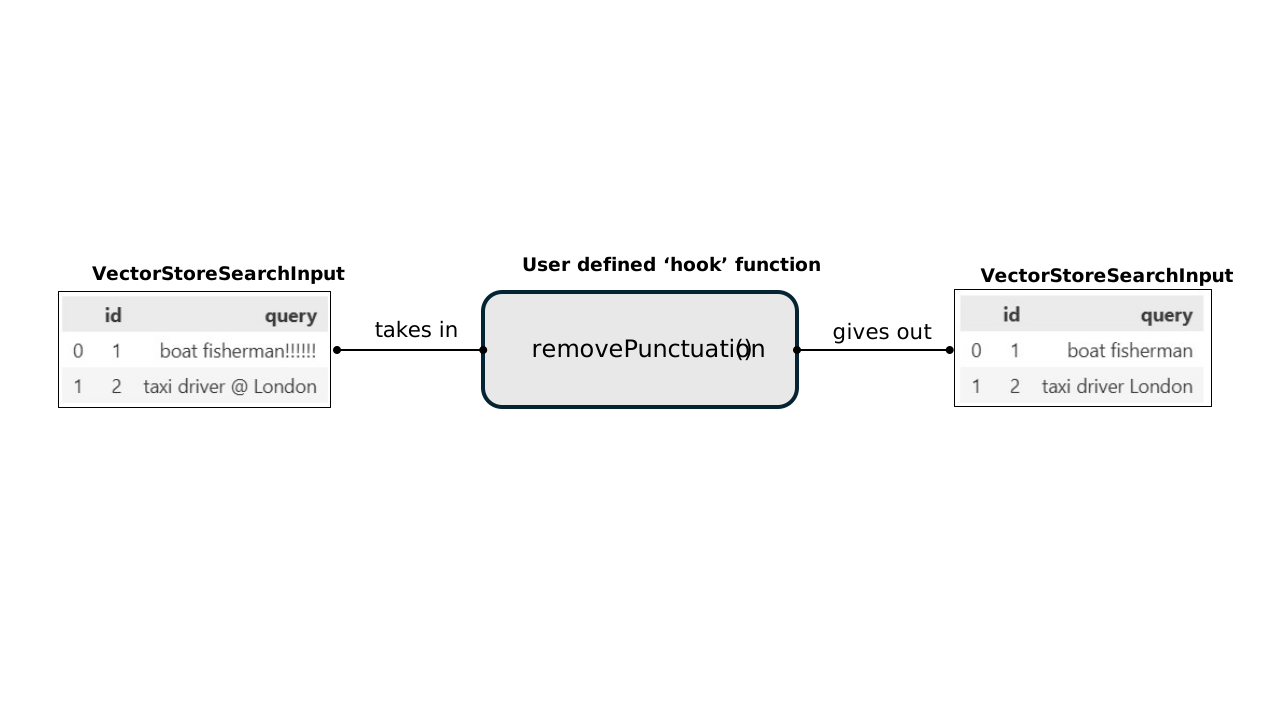
In a later part of the demo, we showcase how to implement this punctuation removing function, and apply it to the vectorstore. The important concept here is that the hook function takes in a VectorStoreSearchInput object, and outputs a valid VectorStoreSearchInput object.
This can then be attached to a VectorStore to run every time the VectorStore search method is called. You can also apply other hooks to other dataclasses and their respective VectorStore methods and chain togtether these custom operations that manipulate the input and output dataclasses of the VectorStore methods.
For example, implmenting 2 hooks for the input and output dataclasses of the VectorStore search method would provide a dataflow:

The above diagram shows a case where two hooks would be implemented: One that operates on the dataclass VectorStoreSearchInputthat is passed to the Vectortore search method; and a second hook operating on the VectorStoreSearchOutput dataclass that is returned from the VectorStore search method.
Hooks can perform pretty much any operation, as long as they accept and return a valid dataclass object - we hope that this provides a lot of freedom to users to be able to transform and manipulate data as needed using ClassifAI.
Example Hook implementations
This section now shows how to define your hook functions, and inject them into the VectorStore so that the hooks run when the corresponding method is called.
Specifically we’ll look at: - a pre-processing function that removes punctuation from input user queries, - a post-processing function removes results rows that have duplicate ids to other rows of the results.
- We will then make a final post-processing function that injects additional SOC definition data to the VectorStore results dataframe and show how this can be chained together with the deduplication code, to make a multi-step post-processing function!
Pre-requisite
If you are new to the package, its recommended to follow through the general_workflow.ipynb notebook tutorial first. That interactive DEMO will showcase the core features of the ClassifAI package. This current notebook provides examples of how to modify the flow of data which is initially described in the general_workflow.ipynb notebook.
Check out the ClassifAI repository DEMO folder for all our notebook walkthrough tutorials including those mentioned above:
https://github.com/datasciencecampus/classifai/tree/main/DEMO
Installation (pre-release)
Classifai is currently in pre-release and is not yet published on PyPI.
This section describes how to install the packaged wheel from the project’s public GitHub Releases so that you can follow through this DEMO and try the code yourself.
1) Create and activate a virtual environment in command line
Using pip + venv
Create a virtual environment:
python -m venv .venvUsing UV
Create a virtual environment:
uv venvActivate the created environment with
(macOS / Linux):
source .venv/bin/activateActivate it (Windows):
source .venv/Scripts/activate2) Install the pre-release wheel
Using pip
pip install "https://github.com/datasciencecampus/classifai/releases/download/v0.2.1/classifai-0.2.1-py3-none-any.whl"Using uv
uv pip install "https://github.com/datasciencecampus/classifai/releases/download/v0.2.1/classifai-0.2.1-py3-none-any.whl"3) Install optional dependencies ([huggingface])
Finally, for this demo we will be using the Huggingface Library to download embedding models - we therefore need an optional dependency of the Classifai Pacakge:
Using pip
pip install "classifai[huggingface]"Using uv pip
uv pip install "classifai[huggingface]"Note! :
You may need to install the ipykernel python package to run Notebook cells with your Python environment
#!pip install ipykernel

#!uv pip install ipykernel
If you can run the following cell in this notebook, you should be good to go!
from classifai.vectorisers import HuggingFaceVectoriser

print("done!")
Demo Data
This demo uses a mock dataset that is freely available on the ClassifAI repo, if yo have not downloaded the entire DEMO folder to run this notebook, the minimum data you require is the DEMO/data/testdata.csv file, which you should place in your working directory in a DEMO folder - (or you can just change the filepath later in this demo notebook)
Normal vectorstore setup
We can start by loading a normal vectorstore up with no additional preprocessing/hooks. We can use one of our fake example known datasets is known to have several rows of data with the same ID value. (You can get this from the github repo at the folder location specified in the code)
from classifai.indexers import VectorStore

vectoriser = HuggingFaceVectoriser(model_name="sentence-transformers/all-MiniLM-L6-v2")


my_vector_store = VectorStore(
    file_name="data/fake_soc_dataset.csv",
    data_type="csv",
    vectoriser=vectoriser,
    overwrite=True,
)
The below code uses our dataclasses to set up some data to pass to the VectorStore search method, notice that: * an exclaimation mark in the query (that in some cases we may want to sanitise) is shown in the results. * Also the results for the below query should also show several rows with the same 'doc_id' value (because our example data file had multiple entries with the same id label)
from classifai.indexers.dataclasses import VectorStoreSearchInput

input_data = VectorStoreSearchInput({"id": [1], "query": ["a fruit and vegetable farmer!!!"]})

my_vector_store.search(input_data, n_results=10)
Making pre- and post- processing hooks
So lets write some functions that will remove punctuation on the user’s input query, before the main logic of the Vectorstore.search() method begins, and remove rows with duplicate IDs from the results dataframe just before the results are retutned from the Vectorstore.search() method
input_data = VectorStoreSearchInput({"id": [1], "query": ["a fruit and vegetable farmer!!!"]})

input_data
import string
from classifai.indexers.dataclasses import VectorStoreSearchOutput
def remove_punctuation(input_data: VectorStoreSearchInput) -> VectorStoreSearchInput:
# we want to modify the 'texts' field in the input_data pydantic model, which is a list of texts
# this line removes punctuation from each string with list comprehension
sanitized_texts = [x.translate(str.maketrans("", "", string.punctuation)) for x in input_data["query"]]
input_data["query"] = sanitized_texts
# Return the dictionary of input data with desired modified values at each desired key
return input_data
def drop_duplicates(input_data: VectorStoreSearchOutput) -> VectorStoreSearchOutput:
# we want to depuplicate the ranking attribute of the pydantic model which is a pandas dataframe
# specifically we want to drop all but the first occurrence of each unique 'doc_id' value for each subset of query results
input_data = input_data.drop_duplicates(subset=["query_id", "doc_id"], keep="first")
# BE CAREFUL: drop_duplicates returns an object of type DataFrame, not VectorStoreSearchOutput so we need to convert back to that type after this operation
input_data = VectorStoreSearchOutput(input_data)
return input_dataAdding our Hooks to the VectorStore
Now when we initialise the Vectorstore we can declare our custom functions in the hooks dictionary.
The Vectorstore codebase looks for specifically named dictionary entries in the Hooks dictionary, to decide what pre and post processing hooks to run. There are hooks for each major methods of VectorStore class.
Each dictionary entry uses the method name of the class and ’_preprocessor’ or ’_postprocessor’ appended to the name. Currenlty the implemented method hooks are:
- for the VectorStore class:
- search_preprocess
- search_postprocess
- reverse_search_preprocess
- reverse_search_postprocess
For our case in this excercise, we are implementig the search_preprocessor and search_postprocessor methods in the VectorStore.
However if we could also add to add a preprocessing or postprocessing hook to a VectorStore reverse search method in a similar manner
my_vector_store_with_hooks = VectorStore(
    file_name="data/fake_soc_dataset.csv",
    data_type="csv",
    vectoriser=vectoriser,
    overwrite=True,
    hooks={
        "search_preprocess": remove_punctuation,
        "search_postprocess": drop_duplicates,
    },
)
Our hooks will run with the VectorStore search method
Now we’ve passed our desired additional functions to our VectorStore initialisation and those hook should run accordingly - lets see:
input_data = VectorStoreSearchInput({"id": [1], "query": ["a fruit and vegetable farmer!!!"]})

my_vector_store_with_hooks.search(input_data, n_results=10)
Oops!
Notice how in the above dataframe, the rank column now leaps over some values in each ranking.
We didn’t reset the ranking values, per query, when we removed duplicate rows…
lets redo that now in a new function and hook it up to our preprocessing hook.
Notice how this time, we changed the name of our paramter in our custom hook functions, thats because it doesn’t matter what the name of the parameter is, we just need to understand that it will take in one argument - the pydantic object associated with the method.
def drop_duplicates_and_reset_rank(input_object: VectorStoreSearchOutput) -> VectorStoreSearchOutput:
    # Remove duplicates based on 'query_id' and 'doc_id'
    input_object = input_object.drop_duplicates(subset=["query_id", "doc_id"], keep="first")

    # Reset the rank column per query_id using .loc to avoid SettingWithCopyWarning
    input_object.loc[:, "rank"] = input_object.groupby("query_id").cumcount()

    # convert the DataFrame back to the pydantic validated object
    input_object = VectorStoreSearchOutput(input_object)

    return input_object
From the cell below, you can see another way to set hooks - by directly accessing the hooks attribute of a running vectorstore:
# and lets access the hooks directly from the vector store instance to modify them
my_vector_store_with_hooks.hooks["search_postprocess"] = drop_duplicates_and_reset_rank
done - now lets run that query again
my_vector_store_with_hooks.search(input_data, n_results=10)This of course still works well when you pass multiple queries as we wrote it to separate on query_id column:
multi_input_data = VectorStoreSearchInput(
    {
        "id": [1, 2],
        "query": ["a fruit and vegetable farmer!!!", "Digital marketing@"],
    }
)

my_vector_store_with_hooks.search(multi_input_data, n_results=10)
Adding Hooks to a VectorStore when loading from filespace
ClassifAI allows you to create your VectorStore once, and then save it to file space so that it can be loaded back in later and reused -
If you’ve followed through with the above code cells you may have noticed that every time we’ve instantiated a VectorStore it has saved a new folder to filespace (overwriting each time).
Use the VectorStore.from_filespace() class method to load the VectorStore back into memory.
Important: any hooks you applied in previous sessions are not saved to the filespace (it can be difficult to serialise functions). The from_filespace() class method has a hook parameter, similar to the VectorStore constructor we saw earlier. When loading from filespace in this way, you must reaplly the hook functions using this parameter or by setting the attribute after loading, as seen above.
The following code cells show an example of loading the VectorStore, that was saved to filespace in this demo, back into memory and reapply the hooks on instantiation.
# you can see we've reused the vectoriser and hooks from before


reloaded_vector_store = VectorStore.from_filespace(
    folder_path="./fake_soc_dataset/",  # YOU MAY NEED TO CHANGE THIS LINE TO THE CORRECT PATH
    vectoriser=vectoriser,
    hooks={
        "search_preprocess": remove_punctuation,
        "search_postprocess": drop_duplicates,
    },
)
We can then continue to use the vectorstore as seem earlier
reloaded_vector_store.search(input_data, n_results=10)Injecting Data into our classification results with a hook
What if we had some additional context information that we wanted to add in our pipeline. It could be some official taxonomy definitions about our doc_id labels, such as SIC or SOC code definitions.
We may want to inject this extra information that’s not directly stored as metadata in the knowledgebase, so that a downstream component (such as a RAG agent) can use the additional information
But we also want keep our existing hook logic that removes punctuation…
official_id_definitions = {
    "101": "Fruit farmer: Grows and harvests fruits such as apples, oranges, and berries.",
    "102": "dairy farmer: Manages cows for milk production and processes dairy products.",
    "103": "construction laborer: Performs physical tasks on construction sites, such as digging and carrying materials.",
    "104": "carpenter: Constructs, installs, and repairs wooden frameworks and structures.",
    "105": "electrician: Installs, maintains, and repairs electrical systems in buildings and equipment.",
    "106": "plumber: Installs and repairs water, gas, and drainage systems in homes and businesses.",
    "107": "software developer: Designs, writes, and tests computer programs and applications.",
    "108": "data analyst: Analyzes data to provide insights and support decision-making.",
    "109": "accountant: Prepares and examines financial records, ensuring accuracy and compliance with regulations.",
    "110": "teacher: Educates students in schools, colleges, or universities.",
    "111": "nurse: Provides medical care and support to patients in hospitals, clinics, or homes.",
    "112": "chef: Prepares and cooks meals in restaurants, hotels, or other food establishments.",
    "113": "graphic designer: Creates visual concepts for advertisements, websites, and branding.",
    "114": "mechanic: Repairs and maintains vehicles and machinery.",
    "115": "photographer: Captures images for events, advertising, or artistic purposes.",
}
def add_id_definitions(input_data: VectorStoreSearchOutput) -> VectorStoreSearchOutput:
# Map the 'doc_id' column to the corresponding definitions from the dictionary
input_data.loc[:, "id_definition"] = input_data["doc_id"].map(official_id_definitions)
return input_dataWe can now combine this with our deduplicating hook in a new function that runs both
def process_results(validated_input_object: VectorStoreSearchOutput) -> VectorStoreSearchOutput:
    # First, remove duplicates and reset rank
    validated_input_object = drop_duplicates_and_reset_rank(validated_input_object)

    # Then, add ID definitions
    validated_input_object = add_id_definitions(validated_input_object)

    # Return the final processed dataframe
    return validated_input_object
lets once again update the postprocessing hook on our vectorstore
my_vector_store_with_hooks.hooks["search_postprocess"] = process_resultsand lets try the search again!
multi_input_data = VectorStoreSearchInput(
    {
        "id": [1, 2],
        "query": ["a fruit and vegetable farmer!!!", "Digital marketing@"],
    }
)

my_vector_store_with_hooks.search(multi_input_data, n_results=10)
We can see a few null values in that last output because our demo list of extra data wasn’t exhaustive, but where an ID does match our ‘official_id_definitions’ data we see the data being added correctly.
Roundup
We wrote and combined several hooks on the Vectorstore class to:
- remove punctuation from queries before the
VectorStore.search()method is executed - remove duplicates from the results list per query ranking and fixed the ranking
- injected data into our dataflow outside of constructing a vectorstore
- chained several Vectorstore.search() postprocessing steps together into one function that calls other functions
- remove punctuation from queries before the
In this scenario we effectively showed how to deduplicate the rows of the results dataframe and add additional context columns of information in the form of the id_definitions. Hopefully, it is clear that you can add many pre- or post-processing steps this way, or by writing all steps in one big function - Hooks give you the flexibility and choice here.
Hooks let you disrupt the normal flow of data in the VectorStores. In this case we just had a small amount of dictionary data being added in, however the hooks allow for more complex scenarios:
- using a 3rd party API to do automated corrective spell checking before passing your queries to the search method
- making an SQL query call to a database to get the extra information you want to inject in each row
- handle errors when the API or database fails and choose what should be returned in these cases
Key Takeaway:
When writing your custom hook, remember that your custom hook function should take a single argument - a specific dataclass, and it should output that same dataclass with the modified rows, columns and values. How you implement the logic to update the values is up to you but it must satify the requirements of that dataclass type.
Depending on which kind of hook you are writing, you need to adhere to the rules of the corresponding dataclass for that hook. For example, in the above demonstration we focused on writing search() preprocessing hooks that manipulate the VectorStoreSearchInput dataclass. However, if you were to write a reverse_search() preprocessing hook, your hook function would need to manipulate the VectorStoreReverseSearchInput dataclass, which has a different set of rules for the columns that must be present and the datatypes of those columns. This extends to each of the hook categories, each of which corresponds to a specific dataclass with its own ruleset.
Next Steps and Challenges:
We focused soley on showcasing pre- and post-processing hooks for the VectorStore search method in this notebook:
- See if you can implement some pre- and post- processing hooks for the VectorStore reverse search method:
- try adding a new column of data to the reverse search results
- make it so that if the user tries to reverse search for a specific ID that is ‘secret’ then that row is removed from the input data.